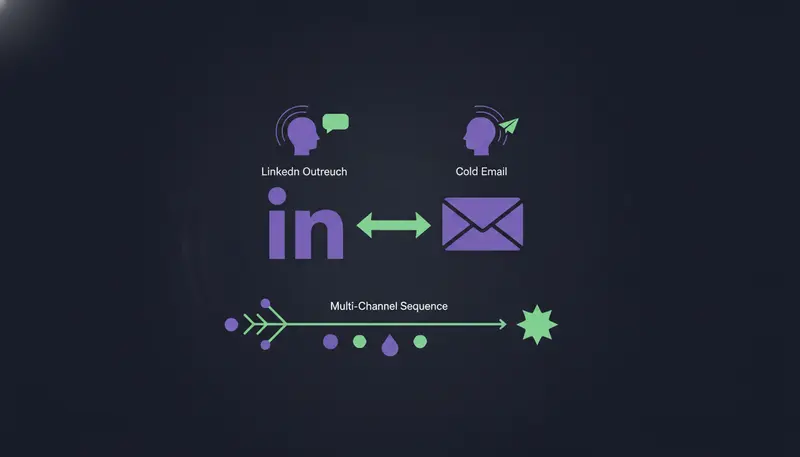
You send cold emails and LinkedIn invites to the same people, but the two run as separate campaigns and nobody answers either. Run one 14-day sequence instead: send a LinkedIn invite on day 1, check on day 4 whether it was accepted, follow up by LinkedIn message if yes and by email if no, and close with one short note on day 14. That is the core of this LinkedIn outreach + cold email multi-channel sequence guide, and a reply on either channel stops the sequence so a person can answer.
By the end you will have a day-by-day schedule, the wait rules between steps, the daily limits to respect and a checklist to run before you switch it on.
Why put LinkedIn and cold email in one sequence?
Most teams run email and LinkedIn as two projects. One person owns the mailbox, another owns the LinkedIn account, and the lead gets two unrelated messages in the same week.
One sequence fixes that. The lead sees you in the inbox and then on LinkedIn, and each message builds on the last. It is close to how a person would follow up by hand.
It also saves time. You write one brief per step, and each step is written for that lead and that channel, so you are not maintaining two campaigns.
A word on results. You will read claims that combining channels doubles or triples reply rates. We can't back a number like that, and yours will depend on your list and your offer. Measure your own, channel by channel.
| Email only | LinkedIn + email | |
|---|---|---|
| Where the lead sees you | Inbox only | Inbox and LinkedIn |
| If one channel stays quiet | Send another email | Switch channel |
| Follow-up format | Another email | A message, an email or a LinkedIn note |
| Daily limits to watch | The mailbox | The mailbox and the LinkedIn account |
| Replies | One channel to watch | Two channels, one inbox to answer from |
What do you need in place before day 1?
A sequence is only as good as the accounts it sends from. Weak copy gets the blame, but accounts that were never warmed up and audiences that are too broad sink more campaigns.
Messages go out from your own connected accounts, such as Gmail, Outlook and LinkedIn, not from a shared server. Your outreach inherits your own domain's reputation, so check SPF, DKIM and DMARC first. New email and LinkedIn accounts should ramp up gradually over three weeks.
Don't rush the brand voice either. In ZOROSDR it must be reviewed before a sequence can go live, and every message is written from it.
Before you turn the sequence on
- Mailbox connected, with SPF, DKIM and DMARC passing
- LinkedIn account connected, with "Warm up gradually" left on if it is new
- Daily limit, sending hours and days set on each account
- Brand voice reviewed
- Rules written, such as "Only contact people who..." and "Never contact..."
- Goal set: a meeting, a reply or an accepted connection
- One audience chosen for this sequence
LinkedIn Outreach + Cold Email: A 14-Day Multi-Channel Sequence
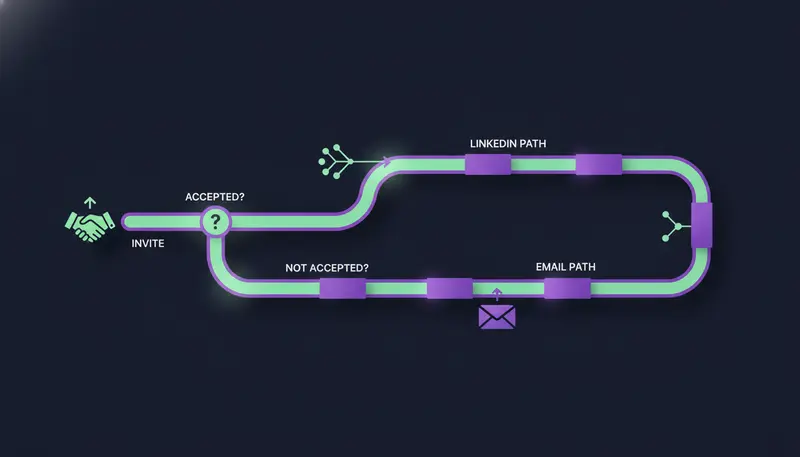
Count the days from the moment a lead enters the sequence. The structure follows the branch example in the sequence editor: an invite first, a branch after three days that asks "Accepted?", then two paths.
- 1Day 1, send the inviteconnect on LinkedIn with one short line and no pitch, so the lead meets you before they read your email.
- 2Day 4, check "Accepted?"a branch sends accepted leads one way and everyone else the other, so no one gets a message that ignores what they did.
- 3Day 4, accepted leads get a LinkedIn messageone pain from their world, one line on how you help, a soft question.
- 4Day 4, other leads get the first emailwritten fresh for that lead, not pasted from the invite.
- 5Day 8, change the formataccepted leads get an email, the others get a short follow-up in the same email thread.
- 6Day 14, close the loopone last short note on the channel you are already using, then end the path.
Put an "End this path" step after the last step of the first path. Without it, those leads carry on into the other path's steps.
Days 1 to 3: the invite
Start with the invite because it costs the lead little and puts your name in front of them on a second channel. A LinkedIn invite is limited to 280 characters, so there is room for one line and no pitch.
Should it carry a note or go blank? A blank request is quick and low-pressure. A one-line note gives a reason to accept. Test both on small batches from the same audience and compare acceptance. For wording ideas, see these 20 LinkedIn connection message examples.
If you want to view the lead's profile first, do it by hand. A profile view isn't a step type in the editor.
Day 4: the "Accepted?" branch
Three days gives the invite a fair chance before you switch channel. Then the branch does the sorting for you.
Accepted leads get a LinkedIn message. Everyone else gets the first email. Here's the catch: the email should stand on its own. Write its brief as if LinkedIn didn't exist, because the lead may never have seen your invite.
Days 8 to 14: change the format, not the pitch
On day 8 the accepted path moves to email, and the other path sends a follow-up. A follow-up email with an empty subject replies in the same thread, which keeps the conversation together.
On day 14 send one last short note and stop. You can add up to 5 follow-ups at a tight, standard or relaxed pace, each with a brief you can edit. For follow-up wording, read cold email follow-up sequences that book meetings.
What about voice notes?
Voice notes are not a step in the sequence editor. If you want to send one, do it by hand on LinkedIn to a lead who accepted and showed interest.
The Hot score can help you choose who deserves that effort. It builds on replies, clicks, website visits, LinkedIn activity, funding and hiring.
How do you write each step so the channels don't repeat each other?
Give each step one job. The invite asks to connect. The LinkedIn message names one pain. The email adds one new reason to reply. Each follow-up is shorter than the message before it.
The AI writes from your website and knowledge, and states no fact you didn't give it. If it doesn't know something, it says it will confirm rather than invent an answer. If a draft keeps missing, add the missing fact to the brand voice's knowledge instead of rewriting the same draft again and again.
How do you stay inside daily sending limits?
Daily limits protect the accounts doing the sending. Every plan sends up to 100 emails a day per mailbox and 50 LinkedIn actions a day per account.
Sequences also send within each lead's local working hours. Set the daily limit and the sending days on each account in the channel settings, then check "Health", which reads Healthy, Worth watching or At risk, and "Sending domain", which says how to fix any SPF, DKIM or DMARC gap.
Curious which other channels can join the same sequence later? The channels page lists them.
What happens when someone replies on LinkedIn or by email?
A reply stops the sequence, whichever channel it arrives on, so a person can answer. Each reply is read and sorted as interested, a question, an objection, not now or stop, and a suggested answer waits for you. Replies always wait for a person, even on sequences that send automatically.
Opt-outs are handled first. System rules catch "stop" and "unsubscribe" before the AI reads the reply, so nobody gets an accidental follow-up. The guardrails page explains the approval and opt-out rules in full.
When a lead replies, their waiting drafts are withdrawn and a reply draft appears in AI Admin. Read the lead's message above it before you approve. To carry on after you have answered, press "Continue sequence" on the lead's page. It takes the replied path at a branch, if you built one.
How do you know the sequence is working?
Open Analytics to see people reached, engaged and meetings booked, by sequence and channel. Start with a small batch from one audience, compare the channels, and change one thing at a time.
The sandbox credits on a new workspace give you room to check lead quality before you scale up. If one channel carries most of the replies, shorten the other path or rebuild its briefs.
Frequently asked questions
Should the LinkedIn invite or the cold email go first?
In the schedule above the invite goes first, because it is light and gives the lead a first look at your name. The email follows on day 4 for anyone who has not accepted. Test the order on a small batch if you prefer email first.
Should a LinkedIn connection request have a note?
Either can work. A blank request is quick, and a one-line note gives a reason to accept. Invites are capped at 280 characters, so keep any note to one line and leave the pitch for later.
How many touches should a 14-day sequence have?
The example uses four touches per lead: the invite plus three follow-up steps. A sequence can have up to 12 steps, but more steps is not better. Keep each one useful.
Can the AI send messages without my approval?
Every first message lands in your inbox as a draft that you approve, edit or skip. Replies to leads always wait for a person.
Summary
Start with the invite, branch on acceptance, change the format on every step, stay inside daily limits and let a person approve and answer. To build it on a small list first, start the 14-day free trial.