You ask ChatGPT for a cold email and get a polite wall of text that opens with "Hope this email finds you well" and could have gone to anyone. The best ChatGPT & LLM prompts for writing personalized cold emails use four parts: a Role (who the AI writes as), Prospect Context (real facts about one person), Strict Constraints (what it must never do) and an Output Format (length and one ask). Banning clichés like "Hope this email finds you well" in the constraints removes them.
By the end you'll have four copy-and-paste prompts, a quick way to check each draft, and a clear view of where prompting alone stops being enough.
Why Generic AI Prompts Produce Bad Cold Emails (And How to Fix Them)
A prompt like "Write a cold email to a head of sales about our software" gives the model almost nothing. So it falls back on the most common cold email it has seen: the stock opener, the vague praise, the three-paragraph pitch.
The model isn't being lazy. It is averaging. An average prompt gets an average email, the kind your prospect has read a hundred times.
Here's the catch: adding adjectives doesn't help. "Make it personal and engaging" is still a vague request. Specific input and firm limits are what fix it.
| Vague prompt | Structured prompt | |
|---|---|---|
| Who writes | "Someone in sales" | A named role with a stated tone |
| What it knows about the prospect | Name and job title | A pasted bio, a post, a company event |
| What it must avoid | Nothing stated | A short list of banned phrases and claims |
| Length | Whatever it likes | A word limit and one question |
| What you get | A template that fits anyone | A draft you can check against the facts |
If nobody replies even when the copy looks fine, it is worth ruling out these five messaging mistakes too.
The Best ChatGPT & LLM Prompts for Writing Personalized Cold Emails Start With Four Parts
Every prompt below uses the same skeleton. Learn it once and you can rebuild any of them from memory.
Role
Tell the model who it is writing as and how that person talks. "A B2B sales rep who writes short, plain emails to busy people" does more than "an expert copywriter". The role sets the voice.
Prospect Context
This part makes the email personal. Paste in the facts: job title, company, a line from their LinkedIn bio, a recent post, a hiring or funding event you found. Add your own offer and one true proof point.
Then add the sentence "use only the facts below". Without it, the model fills the gaps itself.
Strict Constraints
List what it must not do. Ban the openers, the flattery and any claim you can't back up. A stated "never" works better than an implied "be natural", which is why constraints are where robotic phrasing gets removed.
Output Format
Say exactly what you want back: a subject line, a word limit, the number of paragraphs, one question at the end. Ask for "only the email" so you don't get commentary.
Prompt 1: Turning LinkedIn Bios and Posts into Custom Opening Lines
The first line decides whether the rest gets read. This prompt produces only that line, so you can judge it on its own.
You are a sales development rep at a B2B company. Write an opening line for a cold email. Use only the LinkedIn bio and post pasted below this prompt. Mention one specific detail from them in plain words. No flattery, no greeting small talk, no more than 25 words. Do not state anything that is not in the pasted text. Give me three numbered options. The bio and post follow.
Paste the bio and post under it yourself. Don't ask the model to look the person up. You want it working from text you can see.
Pick the option you would say out loud. Throw away any line that only praises the prospect. A detail beats a compliment. For the shortest version of this idea, see these 20 LinkedIn connection message examples.

Prompt 2: Writing the Full Email From One Pain and One Offer
Once the opener works, build the whole email around one problem the prospect is likely to have. One problem, one offer, one question.
You write as a sales rep at a company that sells to B2B teams, in plain words, like one busy professional writing to another. Below this prompt are the prospect's role and company, one recent event at their company, and our offer with one proof point. Use nothing else. Do not use "I came across your profile", "quick question" or "reaching out". No exclamation marks. Do not claim results that are not in the text. If a fact is missing, leave it out. Return a subject line under six words, then a body of 70 words or fewer in three short paragraphs, ending with one low-pressure question. Return only the email.
Every sentence belongs to one of the four parts: Role first, context second, constraints in the middle, format last.
The next step is where most teams slip. They paste the offer but not the proof, so the model invents some. Give it a real proof point, or tell it to leave proof out.
Paste these in before you run the prompt
- The prospect's job title and company
- One real detail from their bio, post or company news
- What you sell, in one sentence
- One true proof point, or a note to skip proof
- The single action you want: a reply, a call, a yes or no
- Your list of banned phrases
Prompt 3: Follow-Ups That Add Something New
Weak follow-ups only point back to the last email. A good one gives the reader a fresh reason to answer.
You are the same sales rep. The first email I sent is pasted below. Write a follow-up that adds one new thing: a short observation, a fact I have pasted, or a different angle on the same problem. Do not mention that this is a follow-up and do not guilt the reader. 50 words or fewer, with one question at the end. Return only the email.
- 1Change the angleeach follow-up should say something the last one didn't, such as a new observation or a different problem.
- 2Add one factgive the model one new true detail, or it will repeat itself.
- 3Shorten iteach follow-up should be shorter than the one before.
- 4Stop when they answeronce a lead replies, opts out or books, the sequence should end. Don't write more follow-ups for someone who has already responded.
Prompt 4: Fixing a Draft That Sounds Robotic
Sometimes a draft is mostly right. Use an editor prompt instead of starting over.
You are an editor. Rewrite the email below so it sounds like a person wrote it quickly. Delete any sentence that could be sent to any company. Replace vague claims with a specific detail from the text, or remove them. Keep it under 80 words. Add no new facts. Return the email, then a short list of what you cut.
The list of cuts is the useful part. After a few rounds you'll see which phrases keep coming back, and you can add them to your constraints.
Four prompts will carry a short list of prospects well. At a few hundred, the copying and pasting becomes the job.
Where Prompts Stop Working and a Workflow Takes Over
Prompts are a good way to learn what works. They get tedious at volume, because every prospect needs fresh research pasted in and your constraints drift between sessions.
ZOROSDR builds the same four parts into the workflow. Your Brand Voice holds the Role: who the AI writes as, your tone and a "Never do this" list. Your knowledge holds the facts, and the AI states nothing that isn't there. If it doesn't know something, it says it will confirm. How the AI learns your brand voice explains the setup.
"Personalise for each lead" is on by default, so each step is written fresh from your brief and what the AI knows about that lead. That is the Prospect Context part, done for you.
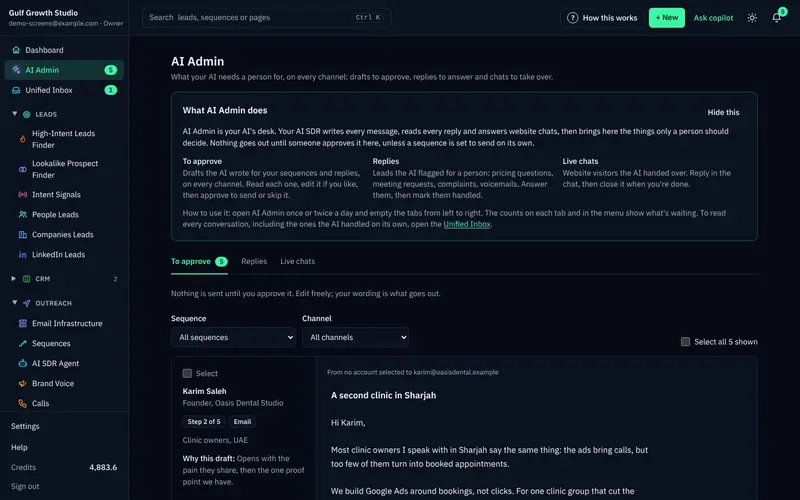
Every first message then lands in AI Admin as a draft. You read why it was written, edit it, ask for a rewrite or skip it. Nothing goes out until a person approves it. The guardrails page covers approval, facts-only writing and opt-outs.
You can test all of this before paying anything. Every new workspace starts with the following.
How to Test a Prompt Before You Trust It
Run each prompt on five real prospects before you use it on fifty. Read the drafts side by side. If two emails share the same second sentence, your context is too thin.
Then check each draft against the list below.
Read every draft against this list
- Every fact in the email appears in what I pasted
- No banned phrase has crept back in
- It is under the word limit
- It asks one question, not three
- It sounds like something I would actually write
- Nothing in it could be sent unchanged to another company
Frequently asked questions
What is the best structure for a cold email prompt?
Use four parts: Role, Prospect Context, Strict Constraints and Output Format. The role sets the voice, the context supplies real facts about one person, the constraints ban clichés and unsupported claims, and the format fixes the length and the single ask.
How do I stop ChatGPT from writing "Hope this email finds you well"?
Name the phrase in your constraints, set a word limit and tell the model to open with one specific detail from the text you pasted. If a draft still slips, run it through the editor prompt in Prompt 4.
How do I stop an LLM from inventing facts in a cold email?
Paste every fact you want used, add "use only the facts below" and "if a fact is missing, leave it out", then read the draft against your notes before sending.
Does ZOROSDR work from prompts like these?
It builds the same ideas into the workflow. It writes from your Brand Voice and the facts you added, and states nothing outside them. Every first message waits in AI Admin for a person to approve, edit or skip.
Summary
A structured prompt gives the model a role, real facts, firm limits and a clear format, and that is what removes the robotic openers. Try the four prompts on five prospects this week and check each draft against the list above.
When you'd rather have those parts built in, start the 14-day free trial. A person approves every message before it goes out.