How many cold emails should you send per day before an inbox starts to look like a spammer? Most teams guess, push one account too hard, and only find out when replies dry up and messages land in spam.
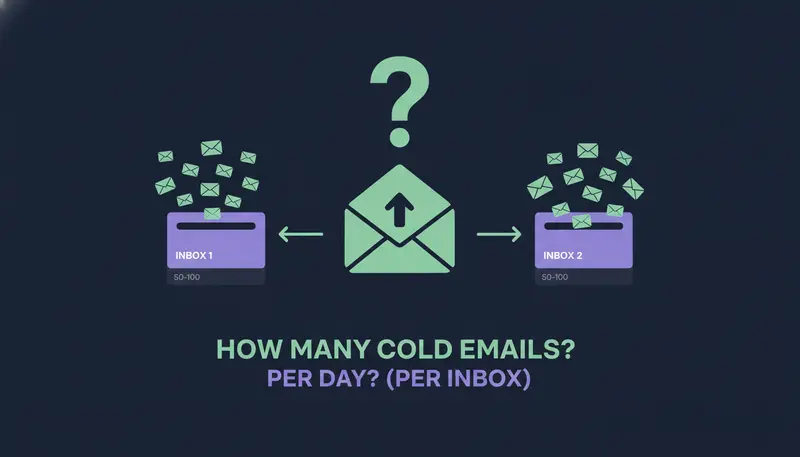
Plan on 25 to 35 cold emails per inbox per day, plus 10 to 15 warmup emails. When you need more volume, add more inboxes and domains instead of pushing one account harder. Treat any higher cap your tools allow as a ceiling, not a target.
By the end you will have a daily limit per inbox, a way to add volume without adding risk, a comparison of Google Workspace and Microsoft 365, and the settings to check before you send.
Safe Daily Cold Email Sending Limits Per Inbox and Domain
The number to plan around
A safe daily limit is 25 to 35 cold emails per inbox, plus 10 to 15 warmup emails. Treat that as a conservative working range, not a guarantee from any mailbox provider. No single number is right for every account, so start at the low end and raise it only while your sends stay clean.
Clean means few failed sends, few bounces and no drop in replies. If any of those slip, drop back before you change anything else.
The warmup emails are separate from your cold sends. ZOROSDR's own warm-up setting works differently: it ramps up the daily sending of a new email or LinkedIn account over 3 weeks.
Why a tool's maximum is not your target
Here's the catch: the cap your software allows is not the number you should use. ZOROSDR lets each mailbox send up to 100 emails a day and each LinkedIn account up to 50 actions a day. Those caps exist to keep accounts safe. They are ceilings.
A mailbox that sends 30 a day reads like a person writing to a prospect. A brand-new mailbox that sends its full allowance from day one is one of the most common ways accounts get flagged.
What moves your number up or down
The range above is a starting point. A few things push it one way or the other:
The age of the inbox. A new account should sit at the low end, or below it, while it warms up.
The quality of your list. Addresses that bounce hurt an account faster than almost anything else, so address checks and bounce handling matter as much as volume.
The way people respond. If replies are healthy, you have room. If failed sends are rising, you do not.
How personal the message is. A short note written for one person behaves differently from the same text sent to everyone.

Scale across inboxes and domains instead
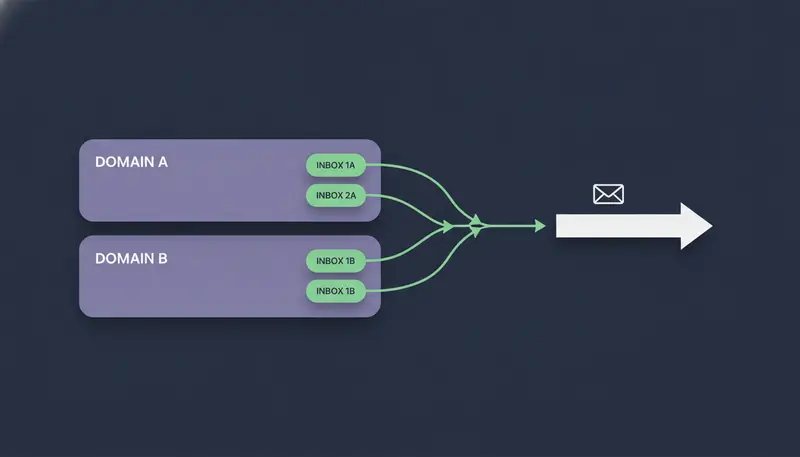
When you need more volume, go sideways. Add inboxes, and spread them over more than one domain you own, so no single account carries the whole load.
The sums are simple. If you want to start about 120 new conversations a day and keep each inbox at 30, you need four inboxes. Put them on two domains and a problem with one domain does not stop everything.
Agencies can use the same logic per client. Sending accounts count toward your plan's total, which is 20 on the Agency plan, shared by your own workspace and all your clients.
- 1Fix the per-inbox limitpick a number in the 25 to 35 range and keep it the same on every inbox, so the maths stays simple.
- 2Divide your daily goal by that numberthe result is how many warmed-up inboxes you need.
- 3Spread inboxes across domainsuse domains that belong to your business, each set up with SPF, DKIM and DMARC.
- 4Add one inbox at a timelet each new one warm up before it takes a full share.
- 5Watch for a week before adding moreif failed sends or bounces climb, fix that first.
Warm-Up: How a New Inbox Should Start
A new inbox has no history. To a mailbox provider, a fresh account that suddenly sends a lot looks like a pattern worth flagging.
The fix is slow, plain and effective. In ZOROSDR, leave Warm up gradually switched on for every new email and LinkedIn account. It ramps sending up over 3 weeks, so you don't have to count by hand.
Our guide on how to warm up a new email account for cold outreach goes through the routine in more detail.
Google Workspace vs. Microsoft 365 for Cold Email
Neither is automatically the safer choice. ZOROSDR connects Gmail, Outlook or any mailbox, and sends from your own account, so the same per-mailbox rules apply on either.
What differs is each provider's own sending rules, which the provider sets and can change. We'd rather not quote a figure that may be out of date, so check the current limits in your Google or Microsoft admin documentation before you scale. If your provider's limit is lower than your plan's, the lower number wins.
| Google Workspace | Microsoft 365 | |
|---|---|---|
| How it connects | Gmail mailbox | Outlook mailbox |
| Daily cap in ZOROSDR | Up to 100 emails per mailbox | Up to 100 emails per mailbox |
| Cold emails per inbox we suggest | 25 to 35 | 25 to 35 |
| Domain checks | SPF, DKIM and DMARC | SPF, DKIM and DMARC |
| The provider's own sending limits | Check Google's current documentation | Check Microsoft's current documentation |
So the choice is less about which provider is safer and more about which one your team already runs well. Pick the one you can set up and monitor properly.
Settings to Check Before You Send
In ZOROSDR the limits live under Settings, channels. The next step is where most teams slip: they connect an inbox and leave every default as it is.
Set these on each account instead:
- 1Set the daily limitenter a number inside your 25 to 35 range for cold email. A mailbox can send up to 100 a day, but that is the ceiling.
- 2Set sending hours and dayschoose when the account sends. Messages also go out in each lead's working hours.
- 3Leave Warm up gradually onit ramps new email and LinkedIn accounts over 3 weeks.
- 4Add a signatureor leave it empty to use the one from your brand voice.
- 5Press Save changesthen run the Health check and the Sending domain check to see what needs fixing.
The Sending domain check looks at your email domain's setup (SPF, DKIM and DMARC) and says how to fix each part. If those three names mean little to you, SPF, DKIM and DMARC explained in plain English is a good place to start.
Signs You Are Sending Too Much
Each connected account carries a Health label: Healthy, Worth watching or At risk. It is based on failed sends, LinkedIn invite acceptance and limits. Press Check now to run it again.
Treat Worth watching as a cue to lower the daily limit, not as a reason to wait and see.
If messages already land in spam, our cold email spam diagnostic checklist walks through the causes in order.
Before you raise any limit
- Health reads Healthy on every connected account
- Failed sends are rare and not rising
- The Sending domain check shows nothing left to fix
- Address checks are on and bounces are being handled
- Accounts under 3 weeks old still have Warm up gradually on
- Each inbox sits inside your 25 to 35 range
- Opt-outs are respected: a stop or unsubscribe reply is caught before anything is written back
How Many Cold Emails Should You Send Per Day Across a Sequence?
Daily volume is only half of it. How you space the steps matters as much.
Leave at least 2 to 3 days between emails in a sequence. Too many steps on one channel, too close together, is a common mistake. A sequence can hold up to 12 steps, and you can add up to 5 email or LinkedIn follow-ups at a tight, standard or relaxed pace.
Spreading a sequence across channels also takes weight off one inbox. A lead might get an email, then a LinkedIn invite, then a message once they accept. A LinkedIn message waits until the invite is accepted, up to 21 days.
WhatsApp and SMS go only to people who agreed to them, so they are not a shortcut for cold volume.
The sequence also stops for a lead as soon as they reply, opt out or book a meeting. That keeps follow-ups from piling onto someone who has already answered.
Why Sending From Your Own Mailbox Matters
ZOROSDR sends from your own connected accounts, not from a shared server. Your outreach inherits your own domain's authority, which is a good thing when your setup is healthy.
The flip side is that your reputation is yours to protect. That is why per-inbox limits matter more than any clever sending trick. Our piece on sending from your own mailbox vs shared servers explains the trade-off.
A safe limit is not a promise of replies or meetings. It only keeps your accounts in good standing while your message does the work.
Frequently asked questions
How many cold emails can I send per day per inbox?
Plan on 25 to 35 cold emails per inbox per day, plus 10 to 15 warmup emails. That is a conservative working range, not a guarantee. Start at the low end and raise it only while failed sends and bounces stay low.
How many inboxes do I need to send more?
Divide your daily goal by the per-inbox number. To start about 120 conversations a day at 30 per inbox, you need four inboxes. Spread them across more than one domain you own and add them one at a time.
Can I send 100 emails a day from one inbox in ZOROSDR?
A mailbox can send up to 100 emails a day, but that is a ceiling that keeps accounts safe, not a recommended setting. New email and LinkedIn accounts should keep Warm up gradually on, which ramps sending over 3 weeks.
Does it matter if I use Google Workspace or Microsoft 365?
Both connect to ZOROSDR, and the same per-mailbox rules apply. Each provider sets its own sending limits and can change them, so check the current documentation from Google or Microsoft before you scale.
Summary
Send 25 to 35 cold emails per inbox per day, add 10 to 15 warmup emails, and grow by adding inboxes and domains rather than volume. Let new accounts warm up over 3 weeks, check Health and your sending domain, and space your follow-ups.
The quickest way to see it in practice is to start the 14-day free trial and set your limits in Settings, channels.