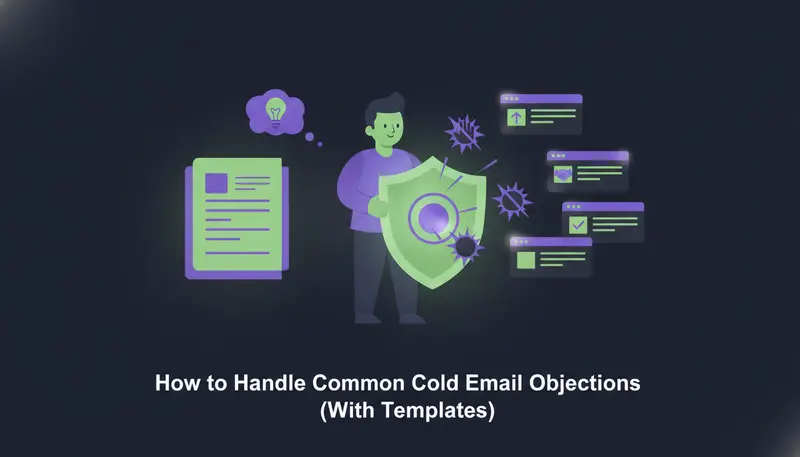
Your cold email finally got a reply, and it says "send me more info" or "not interested." Here is how to handle common cold email objections: validate what the prospect said, answer in under 50 words without getting defensive, and pivot to one low-friction question.
By the end you will have copy-paste replies for the five objections you hear most, plus a checklist to run before you send.
The rule behind every good objection reply
Most weak replies fail for the same reason most weak cold emails fail. They say too much.
A prospect who writes four words is not inviting four paragraphs. They want to know whether you listen, and whether answering you will cost them time. A short, calm reply answers both.
Here is the pattern behind every template in this guide.
- 1ValidateRepeat their point in plain words, such as "Fair enough" or "That makes sense." It shows you read the reply and lowers their guard.
- 2Answer brieflyGive one useful fact or one honest admission in under 50 words. Skip the feature list.
- 3Pivot with one questionAsk something a busy person can answer in a word or two, like "Is it the timing or the fit?"
- 4Stop when toldIf they say no a second time, thank them and leave the thread.
What counts as low friction? "Worth a 30-minute call?" asks for a slice of their calendar. "Which matters more, price or setup?" asks for one word. Pick the second kind.
The same logic applies to your first email. If you want fewer of these objections to begin with, start from high-converting cold email templates for B2B SaaS and keep the ask small there too.
Objection 1: 'Send Me More Information' (3 Copy-Paste Replies)
This is the most common reply, and the least clear. Sometimes it is a polite way to end the thread. Sometimes it is a real request. The words alone won't tell you which.
So don't send a brochure. A PDF with no question attached gives them nothing to answer, and the thread goes quiet.
Here's the catch: the reply has to do two jobs. It agrees to their request, and it finds out what they actually want to see.
Reply A: ask what would help
Happy to send it. So it's useful, which would help most: how it works, what it costs, or how it compares with what you use now?
Reply B: check the timing
Of course. Before I do, is this something you'd look at in the next few months, or more one to know about for later?
Reply C: offer a choice of format
Gladly. Would a one-page summary or a short example of the message we'd write for your team be more useful?
Objection 2: 'We Already Use a Competitor'
This one is better news than it sounds. They have the problem, and they already pay to solve it. Your job is not to prove them wrong. It is to find out whether anything is missing.
Two replies work well.
Good to hear you have something in place. Is there anything you wish it did better, or is it working well enough?
That makes sense, and I'm not asking you to switch. Would it be worth seeing how we handle one thing differently, or should I check back in a few months?
The difference between a good and a bad answer here is tone. One argues. The other is curious.
| Defensive reply | Validating reply | |
|---|---|---|
| Opening | "Actually, ours is better" | "Good to hear you have something in place" |
| Length | A long list of features | Under 50 words |
| The ask | A 30-minute demo | One question about what is missing |
| What it invites | A debate | A short answer |
Notice what the second column never does. It never names the other tool or ranks it.
Objection 3: 'Not Interested'
"Not interested" sounds final, and sometimes it is. Other times it means "not interested in what I assume you're selling." One reply is fair. Two is pushy.
Understood, and thanks for telling me. So I don't send anything irrelevant: is it the timing, or is this not a priority at all?
No problem. If it ever does become a priority, who on your team would look after it?
If their answer is a clear no, close it cleanly.
Understood. Thanks for your time, and I won't write again.
Then keep that promise. Make sure no later step in your sequence sends them anything.
The next step is where most teams slip. They treat "not interested" as a reason to write a cleverer email. It is a reason to stop.
Objection 4: 'Not Now' or 'No Budget'
These are the softest objections. The need may be real and the timing wrong. Treat them as a calendar problem, not a sales problem.
That's fair, and I'd rather not push. Would a short note in a couple of months be welcome, or should I close this out?
Understood. If cost is the main concern, would it help to see what a small starting point looks like?
Use the second reply only if you really have a small starting point, such as a free trial or an entry plan. Don't hint at a discount you can't give.
If they say yes to a later note, write it down and send it when you said you would. For ideas on what that message should say, see our guide to cold email follow-up sequences that book meetings.
Objection 5: 'Wrong Person'
This is a good outcome in disguise. They replied, so they read your email, and they may know who owns the problem.
Thanks for telling me. Who would be the right person to speak to about this?
If they point you to a colleague, thank them in one line. In your first message to the colleague, say who suggested you write, but only if the person actually said you could. Don't guess at a name they didn't give you.
If they don't answer the question, leave it there. Chasing someone for a name is the quickest way to turn a helpful reply into an annoyed one.
When the reply is 'stop' or 'unsubscribe'
This is not an objection. It is an instruction. Don't answer with a pitch, a question or a last offer. Remove the person from every sequence and every list.
In ZOROSDR, system-level rules catch "stop" and "unsubscribe" requests before the AI even reads the reply, which prevents an accidental follow-up. A sequence also stops for a lead as soon as they reply, opt out, book a meeting or move to a closing stage. For the full picture, read what happens when a lead replies to an AI SDR or unsubscribes.
How to handle common cold email objections at volume without sending the wrong thing
One reply at a time is easy to get right. At volume, people get tired and send the wrong template.
In ZOROSDR, every reply is read and sorted: interested, a question, an objection, not now or stop. A suggested answer waits for you. Replies always wait for a person, even on sequences that send automatically.
When a lead replies, their waiting outreach drafts are withdrawn and a reply draft appears in AI Admin instead. That means no cheerful follow-up lands on top of a "not interested."
- 1Read the lead's messageThe reply draft quotes their last message, and "Why this draft" sits on the left of the card.
- 2Edit in the cardChange the text right there. Cut anything that pushes past 50 words.
- 3Approve or ask for a rewritePress "Approve and send," or "Ask for a rewrite" and say what to change, such as "shorter, one question only." A draft can be rewritten up to 5 times.
- 4Discard what's wrongUse "Discard" for a reply you don't want to send.
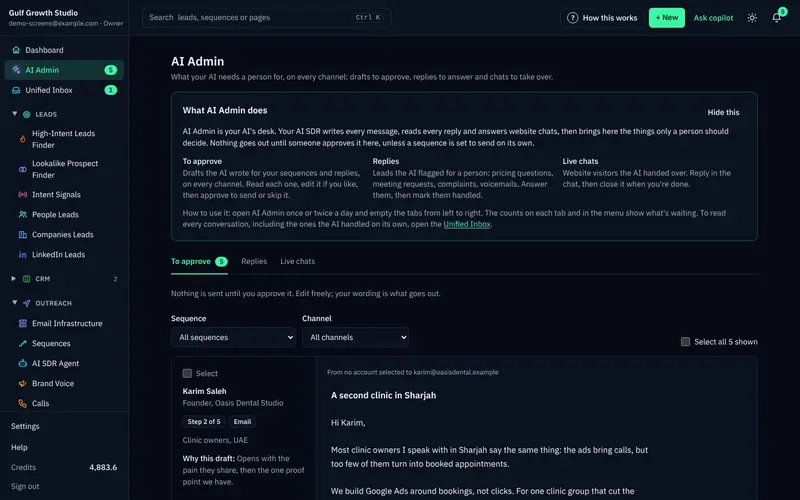
The most common mistake is approving a reply without reading the lead's message above it. The second is rewriting the same draft again and again. If a draft keeps missing, add the missing fact to the brand voice's knowledge instead.
The AI writes only from the facts you gave it. If it doesn't know something, it says it will confirm rather than inventing an answer. You can read more on the guardrails page.
A quick check before you send
Run every objection reply through this list. It takes less time than writing the reply.
Before you hit send
- I repeated their point in plain words.
- The reply is under 50 words.
- I made no claim I can't back up.
- I did not criticise a competitor or the tool they use.
- It ends with one question that takes seconds to answer.
- I did not ask for a meeting unless they asked for a time.
- If they said no twice, I am closing the thread.
- Any opt-out request has removed them from every sequence.
Frequently asked questions
How long should a reply to a cold email objection be?
Under 50 words. Validate their point, give one useful fact or admission, and ask one easy question. If you need more space than that, you are probably explaining instead of listening.
Should I reply when someone says 'not interested'?
Once, briefly. Thank them and ask whether the issue is timing or priority. If they confirm it is a no, close the thread and don't contact them again.
What should I do when a prospect says 'send me more info'?
Don't send a brochure. Agree, then ask what would help most, such as how it works, what it costs or how it compares. Send exactly what they pick, in a few lines.
What if the reply says 'stop' or 'unsubscribe'?
Treat it as an instruction, not an objection. Don't pitch again. Remove the person from every sequence. In ZOROSDR, these requests are caught by system-level rules before the AI reads the reply.
Can AI answer objections for me?
AI can draft the answer, but a person should read it first. In ZOROSDR, replies to leads always wait for a person to approve, edit or discard them, even on sequences that send automatically.
Summary
Validate what they said, answer in under 50 words, and ask one easy question. Stop when someone says no twice, and treat "stop" as an instruction.
If you want help drafting and sorting replies while a person stays in control, start the 14-day free trial. Every new workspace starts with 100 AI-written messages, 25 prospect-finding credits and 10 WhatsApp messages to test with. Prefer to talk it through first? Book a demo.